
Craftomation 101 Getting Started: First Hour on the Ice
Land, spark fire, thaw the rocket, assemble your first CraftoMate, and keep the heat alive.
Craftomation 101: Programming & Craft drops you onto a frozen planet with a tiny rocket, a pile of raw nodes, and almost no warmth. Your job in the first hour is not to terraform the world. Your job is to light fire, thaw the rocket’s cargo, assemble one working CraftoMate, teach it a tiny program, and build a habit of feeding robots before they freeze mid-task.
This guide is written for the full release (2026-09-14) after Early Access began 2024-02-19. The game is single-player on Steam for Windows, macOS, and Linux (developer/publisher: Luden.io). There is no multiplayer — every idle bot is your responsibility.
If you need bindings while you play, keep Controls open. For the full recipe table, use Recipes. Hardware notes live under System Requirements.
Minute zero: look, then craft by dragging
Crafting is physical. You combine items by dragging them together. There is no separate crafting menu for the early chain — when two compatible objects meet, a new one appears and the Objects wiki fills in.
Priority nodes near the landing site usually include Stone, Coal, Soil, Ice, Iron, and Copper Ore. Exact spacing depends on your procedural planet seed, but the recipes never change.
The first three recipes you must know
- Spark = Stone + Stone — rub two stones together.
- Fire = Spark + Coal — feed the spark coal.
- Coal Brick = Stone + Coal — early robot food (about 25 battery; far better than feeding raw scraps).
Drag Fire onto the rocket when prompted. That thaws cargo and starts the real tutorial: bonfire placement, soil unlock, Body and Head parts, and your first program.
Cross-check discovery order with Early Recipes so you do not invent dead ends.
Melt the rocket and place the first bonfire
After Fire reaches the rocket, you typically receive a Bonfire (recipe later: Clay Brick + Coal). Place it where the game highlights — usually to unfreeze a soil source and expand the warm radius.
Light the bonfire with Fire. Heat is not cosmetic: it unlocks tiles, keeps work areas usable, and sets the pace for everything that follows. If the fire dies while you are reading the editor, pause, remake Fire (Stone + Stone → Spark, Spark + Coal → Fire), and drop it back into the pit.
Soon you will craft your own bonfires:
- Clay Brick = Soil + Stone
- Bonfire = Clay Brick + Coal
Place new pits to push the thaw frontier instead of clustering every fire on the rocket pad. For a dedicated loop once you leave hand-crafting, jump to Automate Fire.
Assemble your first CraftoMate
The rocket yields a Body and a Head. Combine them:
- CraftoMate = Body + Head
Later you craft more from advanced parts (Body = Battery + Steel, Head = Radiolamp + Steel), but the first mate is a gift — treat it like fragile infrastructure, not a toy.
Before the robot works, feed it. Make Coal Bricks (Stone + Coal) and give them to the CraftoMate until the battery meter is comfortable. A full brick restores far more energy than tossing Fire or raw Coal at the bot. Details and later ales are covered in Feed Robots.
Cargo Mate comes later (Cargo Body + Cargo Head) for hauling storage boxes. Do not chase cargo logistics until one normal mate can keep a bonfire lit without you.
Your first visual program (keep it tiny)
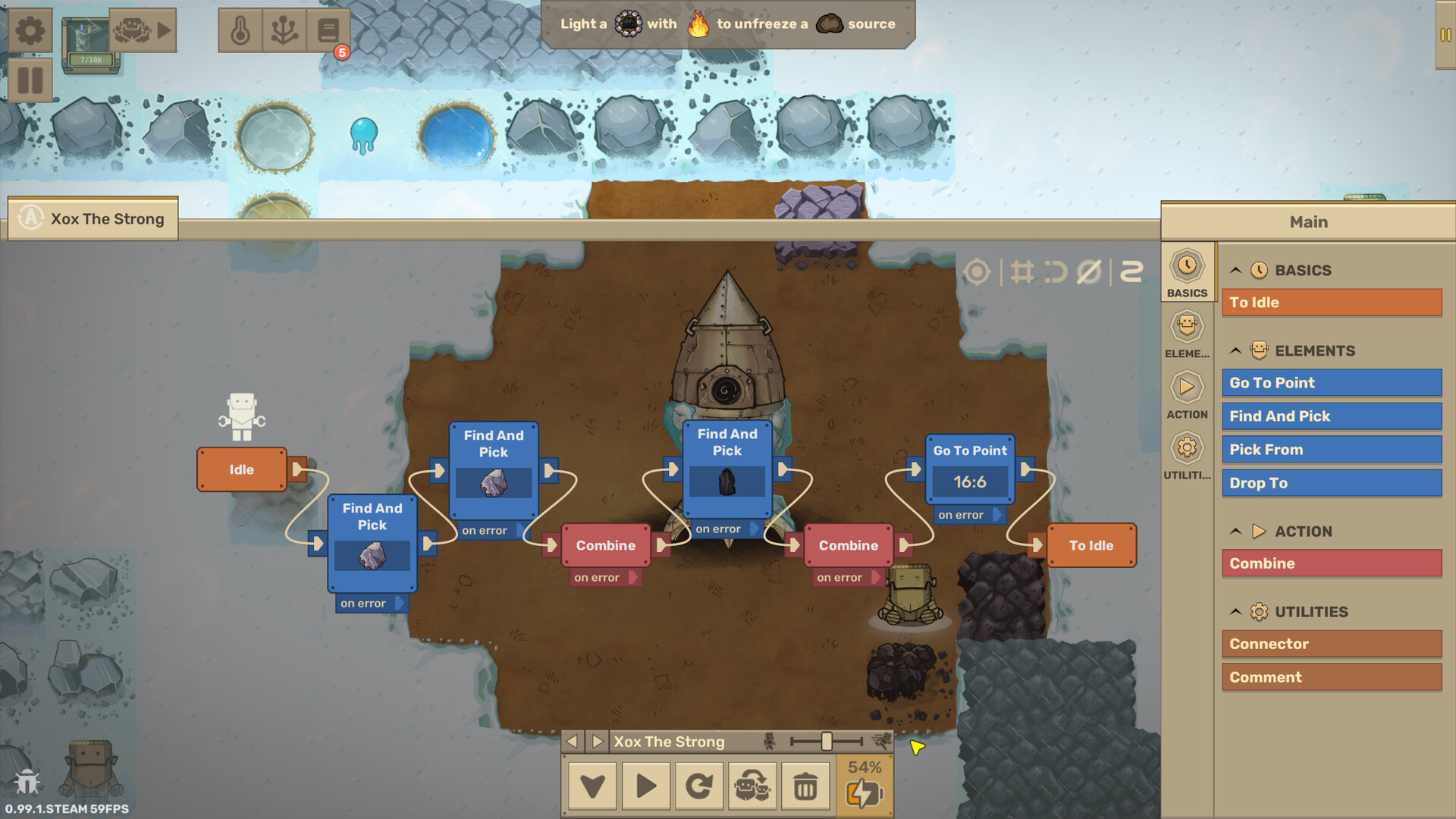
Open the CraftoMate editor and follow the on-screen blocks. The canonical first loop is:
- Find and pick Stone
- Find and pick Stone again
- Combine → Spark
- Find and pick Coal
- Combine → Fire
- Drop to the bonfire tile
- Return to Idle so the sequence repeats
CraftoMates have two hands, so holding Spark and Coal before Combine is intentional. Drop to uses map coordinates — click the bonfire tile, do not guess.
Always close the loop with Idle (or an explicit repeat path). A program that makes one Fire and stops will leave you hand-crafting again within minutes.
When the tutorial ends, deepen the editor with Visual Programming: conditions, energy checks, reusable functions, and step-through debugging.
Research, heat, and the “don’t starve” rule
Early research unlocks better compare tools, functions, and organic helpers. Spend points on whatever lets robots check energy and eat without your click. A brilliant fire maker that dies at 0% mid-map is worse than a slow bot with a fuel branch.
Heat and food are the same crisis wearing two hats:
- Bonfires need Fire to stay lit and push ice back.
- Robots need Coal Bricks (then ales / better fuels) to keep moving.
If you expand the crew before automating fuel, you multiply failure points. Prefer one reliable fire loop and one fuel stockpile before a second specialist. For ordering advice, see Automation Priority.
First-hour checklist
Use this as a pause-screen list:
- Craft Spark and Fire; deliver Fire to the rocket.
- Place and light the first Bonfire; unfreeze soil.
- Assemble Body + Head into a CraftoMate; feed Coal Bricks.
- Program the Fire delivery loop; confirm Idle repeat works.
- Craft Clay Brick → Bonfire; expand heat toward useful nodes.
- Unlock Water (Ice + Fire) when ice is reachable — needed for seeds, ales, and later Steam Batteries.
- Glance at Steel (Iron + Fire) so mid-game parts do not surprise you.
- Never leave a working robot without a fuel plan.
Common first-hour mistakes
- Forgetting Idle — the bot crafts once and naps forever.
- Dropping Fire on the wrong tile — heat does nothing useful; fix Drop to coordinates.
- Feeding raw Coal forever — switch to Coal Bricks immediately.
- Building three bots before a fuel loop — starvation cascades.
- Ignoring seed layout — if coal is far, dedicate a courier earlier or move crafting closer to nodes.
What to read next
- Visual Programming — blocks, loops, conditions, functions
- Automate Fire — hands-off heat and brick production
- Feed Robots — ales, eco/turbo, energy branches
- Recipes and Early Recipes — reference while exploring
- Controls and System Requirements — setup helpers
Survive the first hour with one warm pit and one fed CraftoMate. Everything else in Craftomation 101 is an expansion of that loop.
Frequently Asked Questions
Quick answers to the most common questions.
How do I make Fire in Craftomation 101?
Combine Stone + Stone for a Spark, then Spark + Coal for Fire. Drag Fire to the rocket or into a Bonfire. Full chains are on Recipes.
How do I build a CraftoMate?
Combine Body + Head. The rocket provides the first pair; later craft Body (Battery + Steel) and Head (Radiolamp + Steel). See Early Recipes.
Why did my robot stop working?
Usually empty battery, a missing Idle/repeat link, or a Drop/Find target that no longer exists. Review Feed Robots and Visual Programming.
What should I automate first?
Fire into bonfires, then Coal Bricks for food. Follow Automate Fire and Automation Priority.
Does Craftomation 101 support multiplayer?
No. It is single-player on Steam (Windows/macOS/Linux). Confirm specs on System Requirements.